OpenICE Community Support Forum
Welcome to the OpenICE community support forum. Use this forum for submitting bugs, asking for help, and solving problems you are having with OpenICE software. For ideas, general questions, and conversation please use the discussion forum.
No similar topics found.

0
Answered
 Build OpenICE from source
Hello,
We are trying to use openICE for integration with several different medical devices at the University of Pennsylvania and the surrounding hospitals. We are able to use the demo app that is pre-built but we are having trouble building the code from source.
We have tested this on Windows, Mac and Ubuntu and get to the same stage. We are able to import the project using the eclipse plugin for gradle but there are some bits that don't compile. In particular, the main problem is that the ice environment that is defined in a few idl files is not correctly recognized by the java files (so the most common error is "ice cannot be resolved to a type"). As far as I understand, some java code has to be generated by these specifications but we cannot get eclipse to do it.
Is there some other pluging that we need to install? Or do you think there is some other problem?
Thanks,
Rado
We are trying to use openICE for integration with several different medical devices at the University of Pennsylvania and the surrounding hospitals. We are able to use the demo app that is pre-built but we are having trouble building the code from source.
We have tested this on Windows, Mac and Ubuntu and get to the same stage. We are able to import the project using the eclipse plugin for gradle but there are some bits that don't compile. In particular, the main problem is that the ice environment that is defined in a few idl files is not correctly recognized by the java files (so the most common error is "ice cannot be resolved to a type"). As far as I understand, some java code has to be generated by these specifications but we cannot get eclipse to do it.
Is there some other pluging that we need to install? Or do you think there is some other problem?
Thanks,
Rado

0
Answered
How to host openice (https://github.com/jeffplourde/openice) locally on Win-7
Hi,
I have cloned the OpenICU (master) branch on my Win-7 and hosted it on IIS7.5. When I visit the OpenICU Webdemo page of hosted website (http://localhost/openice/demo.html), the 'Connecting..' status never changes.
Upon debugging, figured out that the generated 'openice.info.js' file is needed under the build folder. Downloaded the same from the OpenICE website (https://www.openice.info/demo.html) and then I started getting the following 404 error trace
http://localhost/socket.io/?EIO=3&transport=polling&t=1427954861373-0
I don't have NodeJs server running on my machine as I presently don't have any insights on how to use it for OpenICE locally.
Any help is highly appreciated.
Thanks.
I have cloned the OpenICU (master) branch on my Win-7 and hosted it on IIS7.5. When I visit the OpenICU Webdemo page of hosted website (http://localhost/openice/demo.html), the 'Connecting..' status never changes.
Upon debugging, figured out that the generated 'openice.info.js' file is needed under the build folder. Downloaded the same from the OpenICE website (https://www.openice.info/demo.html) and then I started getting the following 404 error trace
http://localhost/socket.io/?EIO=3&transport=polling&t=1427954861373-0
I don't have NodeJs server running on my machine as I presently don't have any insights on how to use it for OpenICE locally.
Any help is highly appreciated.
Thanks.

0
Answered
Not able to run OpenICE as a service in BBB rev C (new Debian Image)
Hi,
After loading new Debian image (Open ICE version 0.6.1), OpenICE.exe doesnt run if started as service.
Please advise.
Regards
After loading new Debian image (Open ICE version 0.6.1), OpenICE.exe doesnt run if started as service.
Please advise.
Regards

0
Answered
Philips MX800 Device Adapter Numerics
Hey,
Since getting our Philips MX800 to connunicate correct with OpenICE, I've noticed that some numerics are not being transmitted.
In particular Respiratory Rate, and Exhaled Carbon Dioxide. Neither of these display when viewing the device through the demo apps, although the EtCO2 waveform does come across:
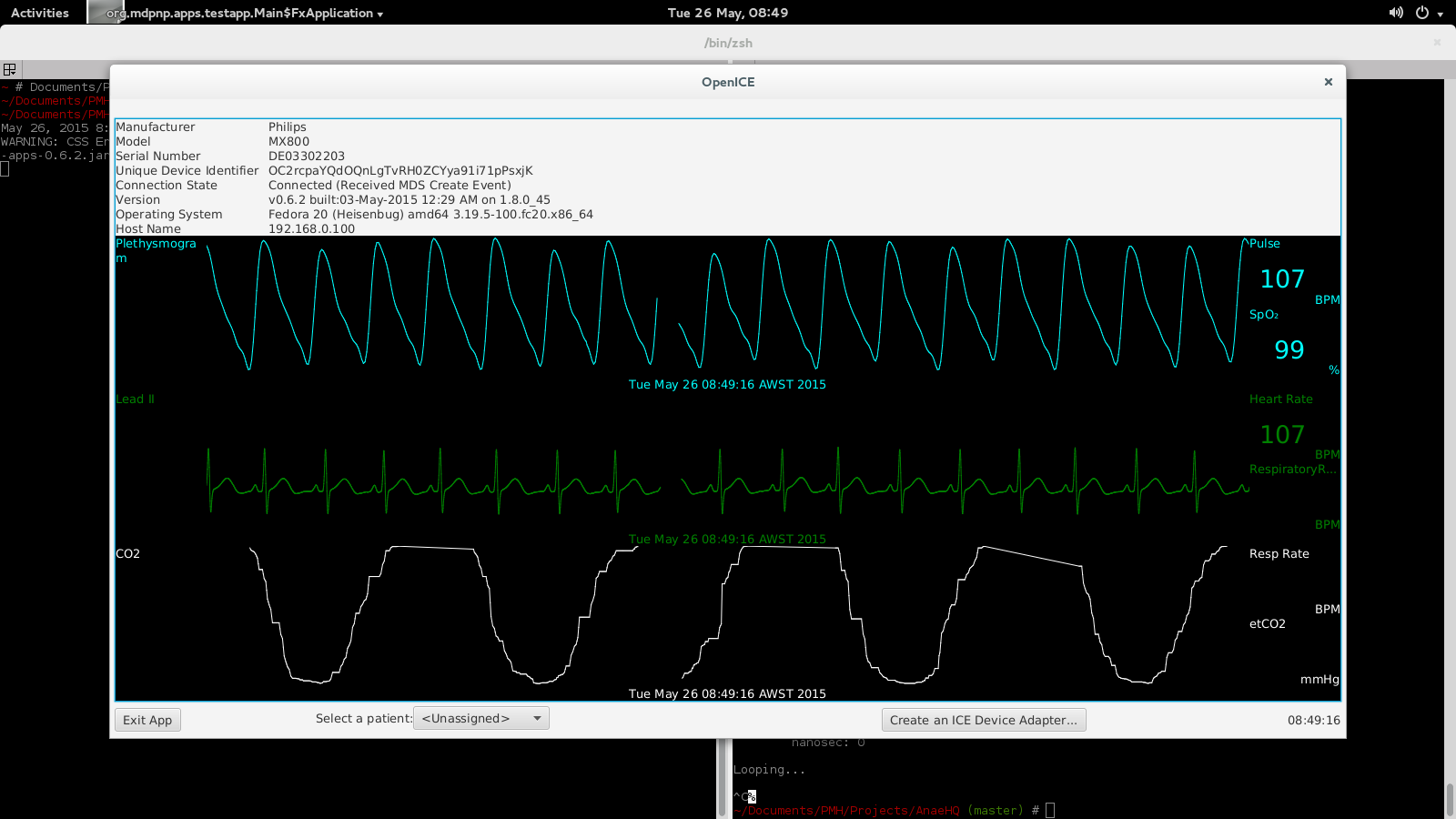
I did notice that the RR values does seem to be present in the messaged produced when I run hello-openice, such as follows:
I noticed that intellivue.map appears to define the numerics and waves that are collected from the monitor. Is it simply a case of modifying this file to include the numerics I require? Or do I have to 'teach' OpenICE or the device adapter about these parameters elsewhere also?
In particular, I'm looking to access
Since getting our Philips MX800 to connunicate correct with OpenICE, I've noticed that some numerics are not being transmitted.
In particular Respiratory Rate, and Exhaled Carbon Dioxide. Neither of these display when viewing the device through the demo apps, although the EtCO2 waveform does come across:
I did notice that the RR values does seem to be present in the messaged produced when I run hello-openice, such as follows:
unique_device_identifier: OC2rcpaYQdOQnLgTvRH0ZCYya91i71pPsxjK
metric_id: MDC_VENT_RESP_RATE
vendor_metric_id: NOM_VENT_RESP_RATE
instance_id: 34628
unit_id: MDC_DIM_RESP_PER_MIN
value: 22.0
device_time :
    sec: 1432600653
    nanosec: 643000000
presentation_time :
    sec: 1432600562
    nanosec: 0
It's currious that these values don't display in the device adapter view. Also, I definately can't find any references to a EtCO2 numeric in the output. Is this cponsistent with your experience with the MX800?I noticed that intellivue.map appears to define the numerics and waves that are collected from the monitor. Is it simply a case of modifying this file to include the numerics I require? Or do I have to 'teach' OpenICE or the device adapter about these parameters elsewhere also?
In particular, I'm looking to access
NOM_AWAY_CO2_ET (from the Philips Data Export Manual) I'd be most appreciative if you could provide some guidance on how to do so.
0
Answered
Android Apps compilation is failed
Hi,
I would like to use Android App,but I can not build it.
NOTE: To build with OpenSplice compatibility please set the OSPL_HOME and SPLICE_TARGET environment variables.
How could I build it?
Best regards.
I would like to use Android App,but I can not build it.
NOTE: To build with OpenSplice compatibility please set the OSPL_HOME and SPLICE_TARGET environment variables.
Defining custom ‘build’ task is deprecated when using standard lifecycle plugin has been deprecated and is scheduled to be removed in Gradle 3.0
FAILURE: Build failed with an exception.
* What went wrong:
Project 'android-apps' not found in project ':interop-lab'.
* Try:
Run with --stacktrace option to get the stack trace. Run with --info or --debug option to get more log output.
BUILD FAILED
Total time: 9.311 secs
---------------------------------------------------How could I build it?
Best regards.

Answer
Jeff Plourde
11 years ago
Hi Hank
The "android-apps" project was a simple demonstration of connecting directly to the Nonin Bluetooth Pulse Oximeter from an Android device. The project is no longer part of the build since 19-June-2013. It remains in the repo for reference but it has been deprecated since that time.
https://github.com/mdpnp/mdpnp/commit/3ca61af431974744813a0c735b8d16104e16c6cc
Thank you
Jeff Plourde
The "android-apps" project was a simple demonstration of connecting directly to the Nonin Bluetooth Pulse Oximeter from an Android device. The project is no longer part of the build since 19-June-2013. It remains in the repo for reference but it has been deprecated since that time.
https://github.com/mdpnp/mdpnp/commit/3ca61af431974744813a0c735b8d16104e16c6cc
Thank you
Jeff Plourde

0
Missing Fields on Puritan Bennet 840
Hallo,
We are currently trying to export data from a local ICU, some of the medical devices that are available to us are supported by openICE. We are experiencing some problems regarding the Puritan Bennett 840 ventilator. When we directly communicate with the ventilator using the SNDF command we get the expected number of fields responce (171). But when the openICE was used only a fraction of the fields were captured (39). We tested it on 3 different ventilators, all of which yielded the same result.
The ventillators were not connected to anyone at that time, is it possible that that was the problem or we should look for something else? The operating system that runs the application is Windows 10.
One note regarding the PB840.
The PB840 has several versions, some of them have a single serial port while others have three ports. The latest openICE version requires two ports for the PB840, connecting it to a machine with only one port leads to an error message that there is no device found on the second port and thus the connection is terminated. We temporary bypassed this issue by building two different versions for the demo apps, the first using the source code as it is, and the second one with a minor change on the PB840Provider.java file:
return new DeviceType(ice.ConnectionType.Serial, "Puritan Bennett", "840", "PB840", 2);
we changed the number of devices from 2 to 1, so that only one port will be requested. Doing so we limit ourselves in capturing only the PB parameters since the DemoPB840.java uses the first port created for the PB parameters and the second for the waveforms ( if i understand it correctly ), but since we are interested only in the parameters, at least for the time being, we are fine with that.
One bug i noticed, though irrelevant to the openICE application.
On the CSVPersister.java the date used to create a testing file was hard coded using the American eastern time zone ( -05:00 ) , that resulted in an error when trying to built the whole project ( i thought it was nessessary at the time) in a different timezone ( +02:00 ).I made the following alteration, which is nothing fancy since my Java knowledge is pretty basic.On the CSVPersister.java file, i added the following library:
import java.time.ZonedDateTime;
and changed the testCVSLine() function to the following:
public void testCVSLine() throws Exception {
SimpleDateFormat dateFormat = DataCollector.dateFormats.get();
ZonedDateTime timeZone = ZonedDateTime.now();
String timeZoneString=timeZone.getOffset().toString();
timeZoneString=timeZoneString.replace(":", "");
Date d0 = dateFormat.parse("20150203.235809.985"+timeZoneString);
Value v = DataCollector.toValue("DEVICE0", "METRIC0", 0, d0.getTime(), 13.31);
String line = CSVPersister.toCSVLine(v);
Assert.assertEquals("Invalid csv line", "DEVICE0,METRIC0,0,20150203235809"+timeZoneString+",13.31", line);
}
The same issue also appears in the DataCollectorTest.java file.
Thanks,
Achilleas

0
DDS Interoperability with commercial and open source based systems
MDPnP et al,
I wanted to find out where the focus in regards to the DDS would currently and in the future?
Tim
I wanted to find out where the focus in regards to the DDS would currently and in the future?
- Will RTI-DDS and Prismtech-DDS be implemented together?
- or one or the other DDS technologies used provided by the above stated vendors?
- Are RTI-DDS, Primstech-DDS and OpenDDS interoperable with each other?
- Does OpenDDS not satisfy all the requirements compared to RTI and Primstech DDS technologies?
- According to OMG specification the DDS is embedded on top of UDP or TCP, is that correct?
- How is DDS different from RTP/RTCP/RTSP and IEC 61850-GOOSE, if we are trying to achieve and implement real-time communication layer?
- Have you guys had any thoughts of looking into Transport Information Collection Protocol (TICP) http://planete.inria.fr/ticp/ on top of IP?
Tim
0
Answered
Running OpenICE on Ubuntu 14.04
Hi all,
We are having trouble getting OpenICE to work on Ubuntu 14.04. We haven't had this problem on our Windows/MAC machines, where we have been able to communicate with multiple devices already.
In particular, I am testing with Nellcore N595, which is just sending data on the serial port. I am able to see the data come in if I just print the stream using minicom (a small tool for printing data coming in on a serial port). But if I try to use OpenICE, I get a PortInUseException on line 198 of the PureJavaCommSerialProvider file. Do you guys know why that might be happening? Do I have to include some other jar files that I am missing?
BTW, I am pretty sure the port is not used by anything else. I have tested with both my usb ports, and I get the same error.
Thanks,
Rado
We are having trouble getting OpenICE to work on Ubuntu 14.04. We haven't had this problem on our Windows/MAC machines, where we have been able to communicate with multiple devices already.
In particular, I am testing with Nellcore N595, which is just sending data on the serial port. I am able to see the data come in if I just print the stream using minicom (a small tool for printing data coming in on a serial port). But if I try to use OpenICE, I get a PortInUseException on line 198 of the PureJavaCommSerialProvider file. Do you guys know why that might be happening? Do I have to include some other jar files that I am missing?
BTW, I am pretty sure the port is not used by anything else. I have tested with both my usb ports, and I get the same error.
Thanks,
Rado
0
Searching answer
Philips Intellivue MP70 Connection
Hi guys,
Sorry to be such a pain, but we are working on several devices in parallel and are getting stuck on all of them right now. We've been trying to connect to a Philips MP70 for several weeks now but to no avail.
The problem is that for some reason openICE doesn't connect and keeps sending association request messages, so we keep receiving what I believe is an association response. As far as I understand, there are multiple revisions of the communication protocol but I'm not quite sure how to find out which version our monitor uses. I was looking through the old topics and saw a picture posted by Jeff where the monitor had a total of 4 ethernet ports, two output and two input. Ours only has two ports - one input and one output (of course, there is also the LAN port, which we don't want to use).
Do you guys know what the problem is or at least where to start looking for it?
Thanks and sorry again!
Rado
P.S. Just so you don't think I'm only trouble, let me say that we are making good progress with the Drager Apollo and are getting ready to start collecting data from it soon, so thanks for that! :)
Sorry to be such a pain, but we are working on several devices in parallel and are getting stuck on all of them right now. We've been trying to connect to a Philips MP70 for several weeks now but to no avail.
The problem is that for some reason openICE doesn't connect and keeps sending association request messages, so we keep receiving what I believe is an association response. As far as I understand, there are multiple revisions of the communication protocol but I'm not quite sure how to find out which version our monitor uses. I was looking through the old topics and saw a picture posted by Jeff where the monitor had a total of 4 ethernet ports, two output and two input. Ours only has two ports - one input and one output (of course, there is also the LAN port, which we don't want to use).
Do you guys know what the problem is or at least where to start looking for it?
Thanks and sorry again!
Rado
P.S. Just so you don't think I'm only trouble, let me say that we are making good progress with the Drager Apollo and are getting ready to start collecting data from it soon, so thanks for that! :)

0
Fixed
 OpenICE Demo-apps on WinXP (32 bits)
Hi Jeff,
Using your advice, I've been able to build my own cable to connect with a Philips MP70 monitor, and with a few modifications to AbstractDevice.java, I've been able to build my own version in Windows 7 that can record waveform data to a csv file. (Thank you for your help!)
However, I need to deploy my code on a Windows XP (32 bit) machine. I run into the following error whenever I try to run ICE_Device_Interface on WinXP (for example, one of the simulated waveforms):
2015-03-20 12:38:42,078 | WARN | Unable to load native library nddscore | com.rti.dds | main
java.lang.UnsatisfiedLinkError: mdPNP\demo-apps-0.5.0\demo-apps-0.5.0\bin\.nddshome\lib\i86Win32jdk\nddscore.dll: This application has failed to start because the application configuration is incorrect. Reinstalling the application may fix this problem
at java.lang.ClassLoader$NativeLibrary.load(Native Method)
at java.lang.ClassLoader.loadLibrary1(Unknown Source)
at java.lang.ClassLoader.loadLibrary0(Unknown Source)
at java.lang.ClassLoader.loadLibrary(Unknown Source)
at java.lang.Runtime.load0(Unknown Source)
at java.lang.System.load(Unknown Source)
at com.rti.dds.util.NativeInterface.extractAndLoad(NativeInterface.java:482)
at com.rti.dds.util.NativeInterface.loadNativeLibrary(NativeInterface.java:172)
at com.rti.dds.util.NativeInterface.loadNativeLibraries(NativeInterface.java:139)
at com.rti.dds.domain.DomainParticipantFactory.<clinit>(Unknown Source)
at org.mdpnp.apps.testapp.RtConfig.loadAndSetIceQos(RtConfig.java:165)
at sun.reflect.NativeMethodAccessorImpl.invoke0(Native Method)
at sun.reflect.NativeMethodAccessorImpl.invoke(Unknown Source)
at sun.reflect.DelegatingMethodAccessorImpl.invoke(Unknown Source)
at java.lang.reflect.Method.invoke(Unknown Source)
at org.springframework.beans.factory.support.SimpleInstantiationStrategy.instantiate(SimpleInstantiationStrategy.java:162)
at org.springframework.beans.factory.support.ConstructorResolver.instantiateUsingFactoryMethod(ConstructorResolver.java:591)
at org.springframework.beans.factory.support.AbstractAutowireCapableBeanFactory.instantiateUsingFactoryMethod(AbstractAutowireCapableBeanFactory.java:1111)
at org.springframework.beans.factory.support.AbstractAutowireCapableBeanFactory.createBeanInstance(AbstractAutowireCapableBeanFactory.java:1006)
at org.springframework.beans.factory.support.AbstractAutowireCapableBeanFactory.doCreateBean(AbstractAutowireCapableBeanFactory.java:504)
at org.springframework.beans.factory.support.AbstractAutowireCapableBeanFactory.createBean(AbstractAutowireCapableBeanFactory.java:476)
at org.springframework.beans.factory.support.AbstractBeanFactory$1.getObject(AbstractBeanFactory.java:302)
at org.springframework.beans.factory.support.DefaultSingletonBeanRegistry.getSingleton(DefaultSingletonBeanRegistry.java:230)
at org.springframework.beans.factory.support.AbstractBeanFactory.doGetBean(AbstractBeanFactory.java:298)
at org.springframework.beans.factory.support.AbstractBeanFactory.getBean(AbstractBeanFactory.java:193)
at org.springframework.beans.factory.support.DefaultListableBeanFactory.preInstantiateSingletons(DefaultListableBeanFactory.java:762)
at org.springframework.context.support.AbstractApplicationContext.finishBeanFactoryInitialization(AbstractApplicationContext.java:757)
at org.springframework.context.support.AbstractApplicationContext.refresh(AbstractApplicationContext.java:480)
at org.mdpnp.apps.testapp.Configuration.createContext(Configuration.java:147)
at org.mdpnp.apps.testapp.DeviceAdapter$DeviceAdapterCommand.execute(DeviceAdapter.java:65)
at org.mdpnp.apps.testapp.Main.main(Main.java:51)
This occurs both with my version, and when running the 0.5 code downloaded from sourceforge. When I look in .nddshome, the i86Win32jdk directory only contains the nddscore.dll.manifest file, but none of the other ndds* files are present. I do have the Microsoft Visual C++ 2005 ATL Redistributable installed on the target machine. I have tried manually copying the needed files over, but the .nddshome directory is cleared at runtime.
Do you have any ideas what might be causing this error? If I needed to regenerate the nddsjava-5.1-mdpnp.jar file, how could I do so? (I have also tried to install the RTI packages on my development machine, if that helps.)
Thanks!
Regards,
Nathan
Using your advice, I've been able to build my own cable to connect with a Philips MP70 monitor, and with a few modifications to AbstractDevice.java, I've been able to build my own version in Windows 7 that can record waveform data to a csv file. (Thank you for your help!)
However, I need to deploy my code on a Windows XP (32 bit) machine. I run into the following error whenever I try to run ICE_Device_Interface on WinXP (for example, one of the simulated waveforms):
2015-03-20 12:38:42,078 | WARN | Unable to load native library nddscore | com.rti.dds | main
java.lang.UnsatisfiedLinkError: mdPNP\demo-apps-0.5.0\demo-apps-0.5.0\bin\.nddshome\lib\i86Win32jdk\nddscore.dll: This application has failed to start because the application configuration is incorrect. Reinstalling the application may fix this problem
at java.lang.ClassLoader$NativeLibrary.load(Native Method)
at java.lang.ClassLoader.loadLibrary1(Unknown Source)
at java.lang.ClassLoader.loadLibrary0(Unknown Source)
at java.lang.ClassLoader.loadLibrary(Unknown Source)
at java.lang.Runtime.load0(Unknown Source)
at java.lang.System.load(Unknown Source)
at com.rti.dds.util.NativeInterface.extractAndLoad(NativeInterface.java:482)
at com.rti.dds.util.NativeInterface.loadNativeLibrary(NativeInterface.java:172)
at com.rti.dds.util.NativeInterface.loadNativeLibraries(NativeInterface.java:139)
at com.rti.dds.domain.DomainParticipantFactory.<clinit>(Unknown Source)
at org.mdpnp.apps.testapp.RtConfig.loadAndSetIceQos(RtConfig.java:165)
at sun.reflect.NativeMethodAccessorImpl.invoke0(Native Method)
at sun.reflect.NativeMethodAccessorImpl.invoke(Unknown Source)
at sun.reflect.DelegatingMethodAccessorImpl.invoke(Unknown Source)
at java.lang.reflect.Method.invoke(Unknown Source)
at org.springframework.beans.factory.support.SimpleInstantiationStrategy.instantiate(SimpleInstantiationStrategy.java:162)
at org.springframework.beans.factory.support.ConstructorResolver.instantiateUsingFactoryMethod(ConstructorResolver.java:591)
at org.springframework.beans.factory.support.AbstractAutowireCapableBeanFactory.instantiateUsingFactoryMethod(AbstractAutowireCapableBeanFactory.java:1111)
at org.springframework.beans.factory.support.AbstractAutowireCapableBeanFactory.createBeanInstance(AbstractAutowireCapableBeanFactory.java:1006)
at org.springframework.beans.factory.support.AbstractAutowireCapableBeanFactory.doCreateBean(AbstractAutowireCapableBeanFactory.java:504)
at org.springframework.beans.factory.support.AbstractAutowireCapableBeanFactory.createBean(AbstractAutowireCapableBeanFactory.java:476)
at org.springframework.beans.factory.support.AbstractBeanFactory$1.getObject(AbstractBeanFactory.java:302)
at org.springframework.beans.factory.support.DefaultSingletonBeanRegistry.getSingleton(DefaultSingletonBeanRegistry.java:230)
at org.springframework.beans.factory.support.AbstractBeanFactory.doGetBean(AbstractBeanFactory.java:298)
at org.springframework.beans.factory.support.AbstractBeanFactory.getBean(AbstractBeanFactory.java:193)
at org.springframework.beans.factory.support.DefaultListableBeanFactory.preInstantiateSingletons(DefaultListableBeanFactory.java:762)
at org.springframework.context.support.AbstractApplicationContext.finishBeanFactoryInitialization(AbstractApplicationContext.java:757)
at org.springframework.context.support.AbstractApplicationContext.refresh(AbstractApplicationContext.java:480)
at org.mdpnp.apps.testapp.Configuration.createContext(Configuration.java:147)
at org.mdpnp.apps.testapp.DeviceAdapter$DeviceAdapterCommand.execute(DeviceAdapter.java:65)
at org.mdpnp.apps.testapp.Main.main(Main.java:51)
This occurs both with my version, and when running the 0.5 code downloaded from sourceforge. When I look in .nddshome, the i86Win32jdk directory only contains the nddscore.dll.manifest file, but none of the other ndds* files are present. I do have the Microsoft Visual C++ 2005 ATL Redistributable installed on the target machine. I have tried manually copying the needed files over, but the .nddshome directory is cleared at runtime.
Do you have any ideas what might be causing this error? If I needed to regenerate the nddsjava-5.1-mdpnp.jar file, how could I do so? (I have also tried to install the RTI packages on my development machine, if that helps.)
Thanks!
Regards,
Nathan
Customer support service by UserEcho



