Your comments

Hi Brad,
Unfortunately we do not manage or even host this service. I will forward your information along though. If you discover any additional details, please feel free to drop them here and I'll see what I can do.
There's a potential work around using email integration. If you email support@openice.info, your email will be sent to our help desk. When I accept the email, it will post to this forum. You will receive email notification of any responses, which you can simply reply to to post on the forum thread. I hope this helps.
Thanks,
Jeff
Unfortunately we do not manage or even host this service. I will forward your information along though. If you discover any additional details, please feel free to drop them here and I'll see what I can do.
There's a potential work around using email integration. If you email support@openice.info, your email will be sent to our help desk. When I accept the email, it will post to this forum. You will receive email notification of any responses, which you can simply reply to to post on the forum thread. I hope this helps.
Thanks,
Jeff
Hi Tim,
OpenICE project includes a JavaScript API for hosting our web-based demo of OpenICE. This web demo functionality is meant to give users a preview of what data is available when using an OpenICE network. If you would like to create your own visualizations or demonstrations to view our lab's data on the web, you're welcome to develop applications that also interact with this JavaScript API.
We have provided documentation of the API here: https://www.openice.info/jsdocs/
The relevant script to require in your work is here: https://github.com/jeffplourde/openice/blob/master/src/openice.js
Thanks,
Jeff
OpenICE project includes a JavaScript API for hosting our web-based demo of OpenICE. This web demo functionality is meant to give users a preview of what data is available when using an OpenICE network. If you would like to create your own visualizations or demonstrations to view our lab's data on the web, you're welcome to develop applications that also interact with this JavaScript API.
We have provided documentation of the API here: https://www.openice.info/jsdocs/
The relevant script to require in your work is here: https://github.com/jeffplourde/openice/blob/master/src/openice.js
Thanks,
Jeff
Hi Zhangtan,
Unfortunately I cannot reproduce the bug you are describing. OpenICE Supervisors will subscribe to all Device-Interfaces publishing on the same network, granted the following conditions are met:
1. Ensure the OpenICE Supervisor and Devices are in the same DOMAIN https://www.openice.info/docs/1_overview.html#run
2. Ensure the OpenICE Supervisor GUI is set to view the correct Patient Partition as the Device (if enabled). By default all devices and supervisors will be in the "Anybody" partition. https://www.openice.info/docs/2_supervisor.html
3. The network is properly configured. This includes enabling DHCP or proper static IP addresses, enabling NTP for time synchronization, ensuring multicast traffic is not disabled to allow the RTPS protocol to function.
Thanks and let me know how else I can help,
Jeff
Unfortunately I cannot reproduce the bug you are describing. OpenICE Supervisors will subscribe to all Device-Interfaces publishing on the same network, granted the following conditions are met:
1. Ensure the OpenICE Supervisor and Devices are in the same DOMAIN https://www.openice.info/docs/1_overview.html#run
2. Ensure the OpenICE Supervisor GUI is set to view the correct Patient Partition as the Device (if enabled). By default all devices and supervisors will be in the "Anybody" partition. https://www.openice.info/docs/2_supervisor.html
3. The network is properly configured. This includes enabling DHCP or proper static IP addresses, enabling NTP for time synchronization, ensuring multicast traffic is not disabled to allow the RTPS protocol to function.
Thanks and let me know how else I can help,
Jeff
Hi Tyler,
I'm a little confused about your setup so if my advice is off-base, I apologize.
It sounds like you have a Beaglebone (BBB) formatted with the OpenICE disk image, running the device-adapter service configured correctly, and the BBB is equipped with an RS232 cape plugged into the serial connection of an MP5. Also plugged into the BBB is an Ethernet network cable to eth0. eth0 is plugged into a network that also has a router with DHCP, NTP clock info, and another computer running the Supervisor which is successfully subscribing to the BBB and displaying the data. Your objective is to use a crossover cable instead of the network to connect a computer directly to the BBB? "Without a supervisor" is confusing me as well. Do you wish to write your own subscriber? (If so check out HelloOpenICE on github)
Here's a little tidbit that may help: BBBs do not have a real-time clock. They negotiate time from the network after boot. The GUI on the supervisor will not display waveforms from an out-of-sync device, even if the data is present on the wire. For this reason it is necessary to provide an NTP time server for the BBB to use to sync on boot. This is out of the scope of OpenICE, but if you run either DHCP with option 43 enabled on the network interface you are plugging the crossover cable into, or alternatively run an NTP server on the network interface, you should be able to fix any time sync issues. I would recommend always using the "System Explorer" app to check for data and connectivity as it is less finicky than the device view.
Connect directly to the BBB and Supervisor computer(s) to ensure your networking and time sync are working.
Thanks and feel free followup with additional questions/clarification. Good luck!
Jeff
I'm a little confused about your setup so if my advice is off-base, I apologize.
It sounds like you have a Beaglebone (BBB) formatted with the OpenICE disk image, running the device-adapter service configured correctly, and the BBB is equipped with an RS232 cape plugged into the serial connection of an MP5. Also plugged into the BBB is an Ethernet network cable to eth0. eth0 is plugged into a network that also has a router with DHCP, NTP clock info, and another computer running the Supervisor which is successfully subscribing to the BBB and displaying the data. Your objective is to use a crossover cable instead of the network to connect a computer directly to the BBB? "Without a supervisor" is confusing me as well. Do you wish to write your own subscriber? (If so check out HelloOpenICE on github)
Here's a little tidbit that may help: BBBs do not have a real-time clock. They negotiate time from the network after boot. The GUI on the supervisor will not display waveforms from an out-of-sync device, even if the data is present on the wire. For this reason it is necessary to provide an NTP time server for the BBB to use to sync on boot. This is out of the scope of OpenICE, but if you run either DHCP with option 43 enabled on the network interface you are plugging the crossover cable into, or alternatively run an NTP server on the network interface, you should be able to fix any time sync issues. I would recommend always using the "System Explorer" app to check for data and connectivity as it is less finicky than the device view.
Connect directly to the BBB and Supervisor computer(s) to ensure your networking and time sync are working.
Thanks and feel free followup with additional questions/clarification. Good luck!
Jeff
Hi Tav,
Unfortunately we do not have plans to develop Device-Adapters for Mindray equipment at this time. We welcome and encourage contributions to the OpenICE project though. If you develop documentation or code to communicate with the Mindray vents, please consider contributing it.
Thanks,
Jeff
Unfortunately we do not have plans to develop Device-Adapters for Mindray equipment at this time. We welcome and encourage contributions to the OpenICE project though. If you develop documentation or code to communicate with the Mindray vents, please consider contributing it.
Thanks,
Jeff
Hi Brooks,
Sorry but we have not used either or the Servo-i or LTV ventilators in the lab. My best advice is to contact your sales representative and ask for the 'data export specification' or 'programmer's guide'. The manufacturer should be able to provide you with the documentation needed to communicate with the device.
Jeff
Sorry but we have not used either or the Servo-i or LTV ventilators in the lab. My best advice is to contact your sales representative and ask for the 'data export specification' or 'programmer's guide'. The manufacturer should be able to provide you with the documentation needed to communicate with the device.
Jeff
Hi Rado,
A couple of years ago, we tried to interface to Alaris pumps and had a very similar experience as you. There is a piece of Alaris proprietary software that integrates some pump data from a network gateway to certain IT endpoints, but I have never used it. Supposedly there is also a log on each pump, but again I've never successfully used it. If you do connect to a pump, I'd love to hear how you managed it.
Sorry for the bad news,
Jeff
A couple of years ago, we tried to interface to Alaris pumps and had a very similar experience as you. There is a piece of Alaris proprietary software that integrates some pump data from a network gateway to certain IT endpoints, but I have never used it. Supposedly there is also a log on each pump, but again I've never successfully used it. If you do connect to a pump, I'd love to hear how you managed it.
Sorry for the bad news,
Jeff

Hi Adrian and Rado,
This is still an open issue unfortunately. As Rado said, Spring will try and use any network connection before proceeding. A work around is to have any network interface up when building. Even if Spring can't reach the web, simply providing an up interface for it to check will allow the build to proceed.
I will let you know when this is fixed as it is not an intended use. Sorry for the inconvenience,
Jeff
This is still an open issue unfortunately. As Rado said, Spring will try and use any network connection before proceeding. A work around is to have any network interface up when building. Even if Spring can't reach the web, simply providing an up interface for it to check will allow the build to proceed.
I will let you know when this is fixed as it is not an intended use. Sorry for the inconvenience,
Jeff
Hi Tyler,
As you know, there are two ways of connecting an MP5 to OpenICE: serial and Ethernet. The MP5 may or may not have a serial connector but will definitely have an Ethernet connector. The serial connector will be an RJ45 form-factor port labeled RS-232, MIB, or with a symbol of an arrow pointing out of a circle as seen here: https://www.openice.info/docs/5_device-adapter-config.html#connect-devices. The Ethernet port will be labelled LAN and is typically used to connect the MP5 to a central station.
The error message "Unsupported LAN" indicates that the MP5 cannot obtain an IP address from the BOOTP server on the network. This message tells me that you are connected to the LAN port on the MP5. If you wish to connect to the MP5 via the LAN connector, you will need to set up a BOOTP server, as described by the MP5 manual, to allow the MP5 to obtain an IP address. You will also need to run the OpenICE device-adapter with the IP that the MP5 is assigned.
To connect to the MP5 via serial, plug into the port described above. Searching Google for MP5 serial port delivered the following picture (that may be useless to you). If available, you can use this port to connect via serial communication. The pinout of the RJ45 to DB9 cable is found here: http://www.frankshospitalworkshop.com/equipment/documents/ecg/service_manuals/Philips_IntelliVue_MP5_Patient_Monitor_-_Service_manual.pdf#page=228. Please note the software revision of your device and consult your manual to ensure the pinout is accurate. Similar instructions for an MP70 connected to a Beaglebone can be found here: https://www.openice.info/docs/5_device-adapter-config.html#required-hardware-mp70.
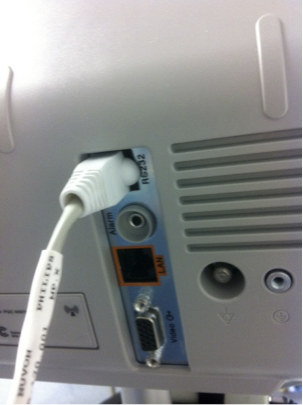
I hope this helps,
Jeff
As you know, there are two ways of connecting an MP5 to OpenICE: serial and Ethernet. The MP5 may or may not have a serial connector but will definitely have an Ethernet connector. The serial connector will be an RJ45 form-factor port labeled RS-232, MIB, or with a symbol of an arrow pointing out of a circle as seen here: https://www.openice.info/docs/5_device-adapter-config.html#connect-devices. The Ethernet port will be labelled LAN and is typically used to connect the MP5 to a central station.
The error message "Unsupported LAN" indicates that the MP5 cannot obtain an IP address from the BOOTP server on the network. This message tells me that you are connected to the LAN port on the MP5. If you wish to connect to the MP5 via the LAN connector, you will need to set up a BOOTP server, as described by the MP5 manual, to allow the MP5 to obtain an IP address. You will also need to run the OpenICE device-adapter with the IP that the MP5 is assigned.
To connect to the MP5 via serial, plug into the port described above. Searching Google for MP5 serial port delivered the following picture (that may be useless to you). If available, you can use this port to connect via serial communication. The pinout of the RJ45 to DB9 cable is found here: http://www.frankshospitalworkshop.com/equipment/documents/ecg/service_manuals/Philips_IntelliVue_MP5_Patient_Monitor_-_Service_manual.pdf#page=228. Please note the software revision of your device and consult your manual to ensure the pinout is accurate. Similar instructions for an MP70 connected to a Beaglebone can be found here: https://www.openice.info/docs/5_device-adapter-config.html#required-hardware-mp70.
I hope this helps,
Jeff
Customer support service by UserEcho


The absence of a measurement module is going to cause some problems. Obviously you'll have no data to collect or display (even in demo mode). The "Connected (Received MDS Connection Event)" message is a very promising sign that it will work with a module connected.
1. We have not connected to an MP90. Compatibility is usually determined by the software revision however so it may work.
2. I think it's safe to say that code is not stable. At the risk of butchering the answer, I'm going to defer to one of the developers. Stay tuned. I'm going to recommend reading the "Intellivue Programmer's Guide" documentation anyways.
Thanks,
Jeff