Your comments

Hey Thomas,
The left-most diagram is a cross section of a male connector plugged into a female connector. Use the pin connection numbering described by the drawing with the pin layout of the smaller drawings. The pinouts on the two smaller individual illustrations are the correct layout for each gender connector. The pin numbering is standardized so feel free to Google around for better pictures.
Thanks,
Jeff
The left-most diagram is a cross section of a male connector plugged into a female connector. Use the pin connection numbering described by the drawing with the pin layout of the smaller drawings. The pinouts on the two smaller individual illustrations are the correct layout for each gender connector. The pin numbering is standardized so feel free to Google around for better pictures.
Thanks,
Jeff
Hi Alistair,
Our (unofficial) support is limited to devices we have in the lab. We have an MP70 rev J and MX800 rev J that both work with our Intellivue Serial device adapter. We try to help support devices we don't own, but there's really no way for us to definitively know without being able to regression test hands-on in the lab.
Thanks,
Jeff
Our (unofficial) support is limited to devices we have in the lab. We have an MP70 rev J and MX800 rev J that both work with our Intellivue Serial device adapter. We try to help support devices we don't own, but there's really no way for us to definitively know without being able to regression test hands-on in the lab.
Thanks,
Jeff
Hi Rado,
OpenICE v0.6.1 now features two GUI inputs for serial interfaces for the PB840 device-adapter. The new version can be downloaded from http://mdpnp.sourceforge.net/. Thank you for your input on this issue.
Thanks,
Jeff
OpenICE v0.6.1 now features two GUI inputs for serial interfaces for the PB840 device-adapter. The new version can be downloaded from http://mdpnp.sourceforge.net/. Thank you for your input on this issue.
Thanks,
Jeff

Hey Rado,
I just reproduced this - you are absolutely right. Ubuntu without an internet connection will fail. This is a spring configuration error with how the application tries to locate XML schemas on the web. It's in the queue to be fixed ASAP.
Sorry for the inconvenience. And THANK YOU for helping by bringing errors like this our attention. We have a small team and limited resources to test everything everywhere at the pace we're moving. Every bit of help is appreciated.
Jeff
I just reproduced this - you are absolutely right. Ubuntu without an internet connection will fail. This is a spring configuration error with how the application tries to locate XML schemas on the web. It's in the queue to be fixed ASAP.
Sorry for the inconvenience. And THANK YOU for helping by bringing errors like this our attention. We have a small team and limited resources to test everything everywhere at the pace we're moving. Every bit of help is appreciated.
Jeff
Hi Rado,
This is an interesting question that has two possible answers for you:
If you are using the OpenICE supervisor GUI, and you click create a device adapter, select Puritan Bennett 840, the GUI only presents you with one serial port dropdown. It should present you with two selectors - one for waveforms, one for everything else. This is an error and I will put it in the queue to fix - thank you for bringing it to our attention. In the meantime, try starting the PB840 device adapter from the command line with options. On Ubuntu, the command from the OpenICE directory would be:
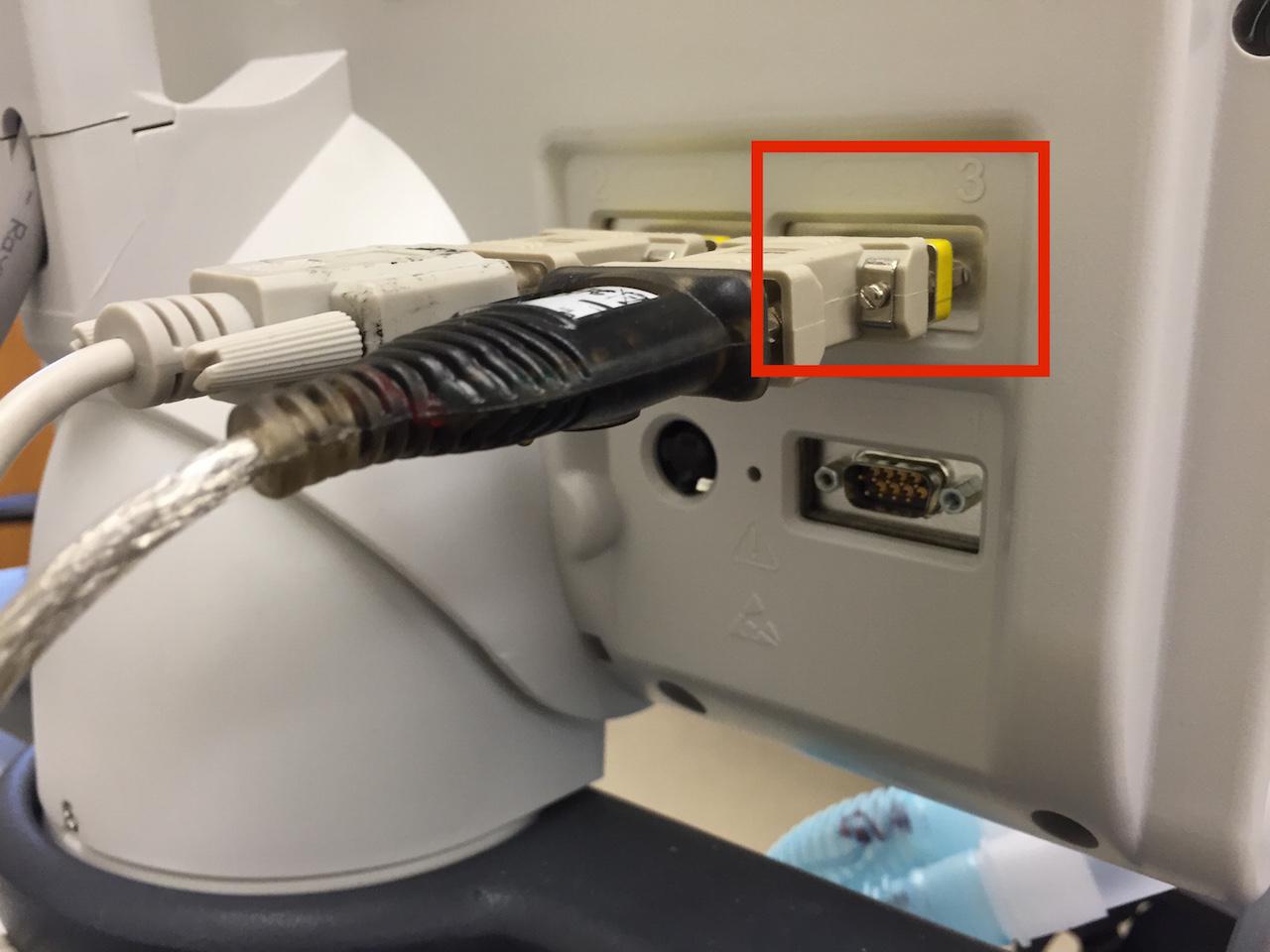
The PB840 is an interesting device with respect to the data export interfaces. The PB840 has several versions available, some with the capability to export waveforms some without. The easiest way to tell is to look at the back of the monitor and count the serial ports. Newer PB840s will have three ports - see the attached photo: PB840-serial-ports.JPG. Port 3 is the "high-speed" waveform port. To configure this port for use on PB840 GUI, on the lower screen touch "other screens" > "communication setup" > then touch the top box with the 3 and set it to waveforms - see the attached photo: PB840-comm-setup.JPG.
Hope this helps. Let me know if this works for now,
Jeff
This is an interesting question that has two possible answers for you:
If you are using the OpenICE supervisor GUI, and you click create a device adapter, select Puritan Bennett 840, the GUI only presents you with one serial port dropdown. It should present you with two selectors - one for waveforms, one for everything else. This is an error and I will put it in the queue to fix - thank you for bringing it to our attention. In the meantime, try starting the PB840 device adapter from the command line with options. On Ubuntu, the command from the OpenICE directory would be:
$ bin/demo-apps -app ICE_Device_Interface -domain 15 -device PB840 -address ttyO0,ttyUSB0 &
The PB840 is an interesting device with respect to the data export interfaces. The PB840 has several versions available, some with the capability to export waveforms some without. The easiest way to tell is to look at the back of the monitor and count the serial ports. Newer PB840s will have three ports - see the attached photo: PB840-serial-ports.JPG. Port 3 is the "high-speed" waveform port. To configure this port for use on PB840 GUI, on the lower screen touch "other screens" > "communication setup" > then touch the top box with the 3 and set it to waveforms - see the attached photo: PB840-comm-setup.JPG.
Hope this helps. Let me know if this works for now,
Jeff
Customer support service by UserEcho



Please try version 0.6.2. We've corrected a minor bug with a major impact that we think caused this error. Sorry for the inconvenience and time delays. Let me know if the new version works.
Jeff